Home › How to make an Ozil AI goal video
How to Make an Ozil AI Goal Video (Step-by-Step)
Quick answer: upload one clear photo of one person to the Ozil Goal generator, pick 5–15 seconds and a 9:16 or 16:9 format, press Generate, then download the clip and add the trending sound inside TikTok or Reels. No editing skills needed.
What you need
- One photo of one adult (you, or someone who agreed to it).
- JPG, PNG or WEBP, ideally at least 720px on the short side.
- A DuetBooth account with credits — that is where the video is generated and saved. One-time packs start at $9.99.
Step-by-step
Choose the right photo
Pick one sharp, well-lit photo of a single adult. Face visible, no sunglasses, nothing covering the face. Full body or waist-up works best; the clothes in the photo are what the player will wear on the pitch.

A clear face is a good starting point. Use even lighting, keep the face unobstructed, and choose a photo of just one person. This AI-generated portrait illustrates the lighting and face visibility to aim for; a waist-up or full-body photo gives more outfit detail. Open the Ozil Goal generator
Use the generator on the ozil-goal.com homepage. It opens the Ozil Goal template on DuetBooth, where you sign in so your videos are saved to your history.
Upload your photo
Upload a JPG, PNG or WEBP. If the photo has several people, crop it to one person first — group photos confuse the result.
Pick length, format and quality
Choose 5, 10 or 15 seconds. Use vertical 9:16 for TikTok, Reels and Shorts, or 16:9 for YouTube and desktop. Pick 480p, 720p or 1080p — higher quality uses more credits.
Generate and wait
Press Generate. Wait times depend on length, quality and queue. You can close the tab — the video keeps processing and appears in your history.
Download and post
Download the video, add the trending sound inside TikTok or Instagram from their music library, and tag it #ozilgoal or #ozilbounce.
Which settings should I choose?
| Goal | Length | Format |
|---|---|---|
| Quick TikTok / Reels loop | 5s | 9:16 |
| Full move with the two-defender moment | 10s | 9:16 |
| Slower, more dramatic build-up | 15s | 9:16 or 16:9 |
| YouTube or desktop sharing | 10–15s | 16:9 |
Photo tips that make the biggest difference
- Light: daylight or a bright room beats a dim bar photo.
- Framing: the face should be clearly visible and not tiny in the frame.
- One person only: crop out friends and pets.
- Funny outfit: suits, aprons, pajamas and cardigans are what make the trend land.
- No filters: beauty filters and heavy edits can make the result look less like the person.
What you get
A short AI-generated video of the person in your photo playing in a floodlit stadium and finishing the solo goal, in the length and format you picked. The video comes with ambient match sound, and you can add a trending sound in the app you post to. You can generate again if you want a different take.
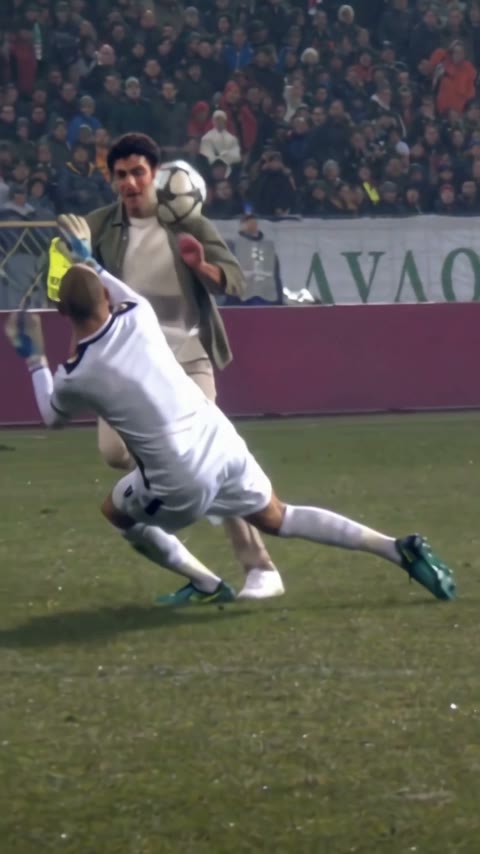 Lift the ball over the keeper
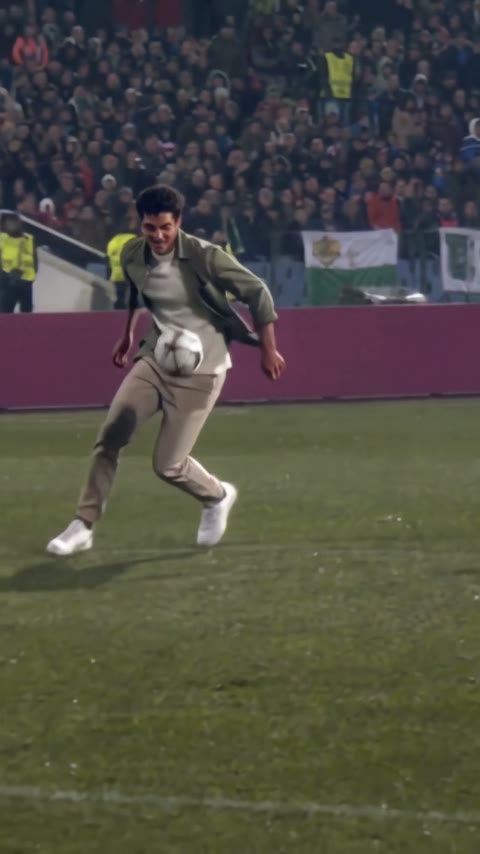 Continue with the ball
Do's and don'ts
- Do label the video as AI-generated when you post it.
- Don't upload photos of children, celebrities or anyone who has not agreed.
- Don't present the clip as real match footage.
Common questions
Why does my video look different from the photo?
Low light, small faces and side angles give the AI less to work with. Try a brighter, front-facing photo where the face fills more of the frame.
Why did the player not finish the move?
Short lengths leave less time for the full sequence. Choose 10 or 15 seconds if the 5-second version feels rushed, and regenerate if a run looks off.
Can I make a version with my grandma or a cartoon character?
Yes, as long as you have permission to use the photo. Illustrated or game-style characters work when the full body is clear.
Is it free?
No. The guides on ozil-goal.com are free to read, but generating a video on DuetBooth uses paid credits. One-time credit packs start at $9.99, no subscription required, and credits are returned if a render fails.
Want the backstory first?
Learn where the move comes from and why it went viral in What is the Ozil Goal trend, or go straight back to the Ozil Goal generator.